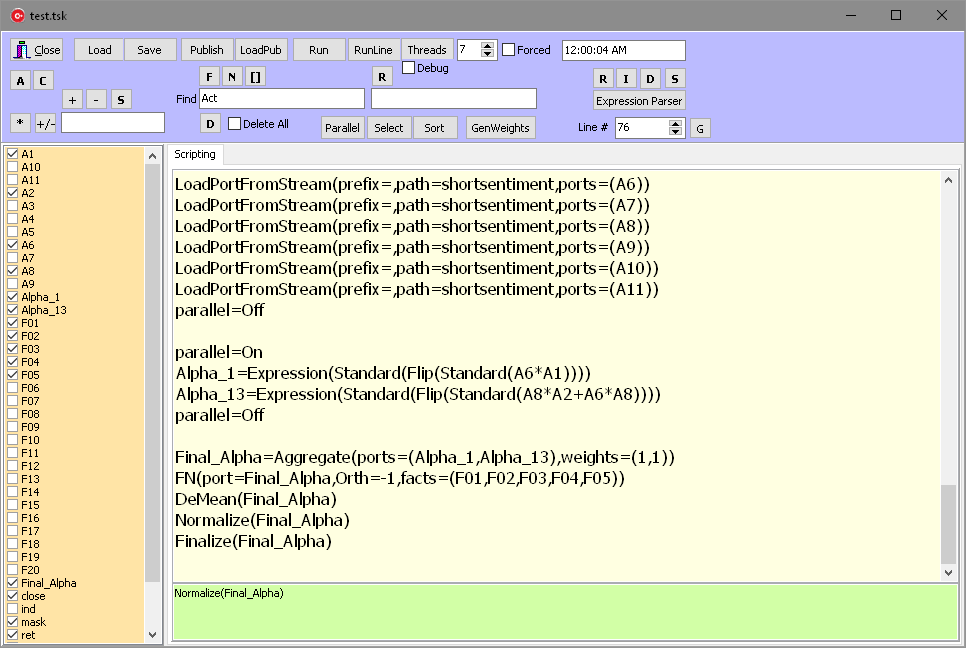
Parallel Sections allow execution of the code in parallel threads and will allow faster execution after the alpha is deployed in production.
Parallel sections are created automatically when independent transformations are applied to many items. For instance, if two alphas (A1 and A2) are checked and the Normalize (N) is pressed, the following code is generated:
parallel=On
DeMean(A1)
DeMean(A2)
parallel=Off
parallel=On
Normalize(A1)
Normalize(A2)
parallel=Off
However, there are instances when the script cannot decide if the parallel section is possible. If you compute the following Expressions:
Alpha_1=Expression(Standard(Flip(Standard(A6*A1))))
Alpha_13=Expression(Standard(Flip(Standard(A8*A2+A6*A8))))
and you know that the second one has no dependency on the previous one, then you can set the parallel section manually (select the two lines and press the Parallel button).
Cleaning the Code
The initial script that runs when you Load the Project contains instructions that might not be needed in the end. Also, you could have been investigating ideas that were abandoned and the final product (the alphas for which there is a Finalize statement) does not needs those either.
Consider the case where you run the Load Project, open attributes A1-A11, construct the two alphas as shown above, aggregate them to create the Final_Alpha. For this alpha, you apply factor neutralization, demean and normalize.
Click the button A (left upper corner) and note that the list on the left (in orange) is populated and some items are checked. Items that are not checked are not needed, and you can clean the script by removing the corresponding code. You can do that by pressing button C (next to A). But before doing this save the script. We should be able to revert if something goes wrong. Cleaned scripts should be retested before summiting them to production.